

Designing REST APIs That Developers Actually Understand
Most developers can build APIs.
But very few can design them properly.
And when API design goes wrong, everything becomes painful:
- confusing endpoints
- inconsistent responses
- hard-to-maintain backend
In this guide, you'll learn REST API design from scratch not just theory, but how things actually work in real systems.
By the end, you'll be able to design your own APIs confidently.
What is a REST API?
A REST API (also called a RESTful API) is a way to design APIs using standard web rules.
Instead of building custom communication systems, REST uses HTTP — the same protocol that powers the web.
In REST, everything is treated as a resource (like users, orders, or bookings), and each resource is accessed through a URL.
You interact with these resources using HTTP methods like GET, POST, PUT, PATCH, and DELETE, and the server usually responds with structured data in JSON format.
Because REST is built on top of the web, it's simple to understand, widely supported, and used almost everywhere today.
How a REST API works
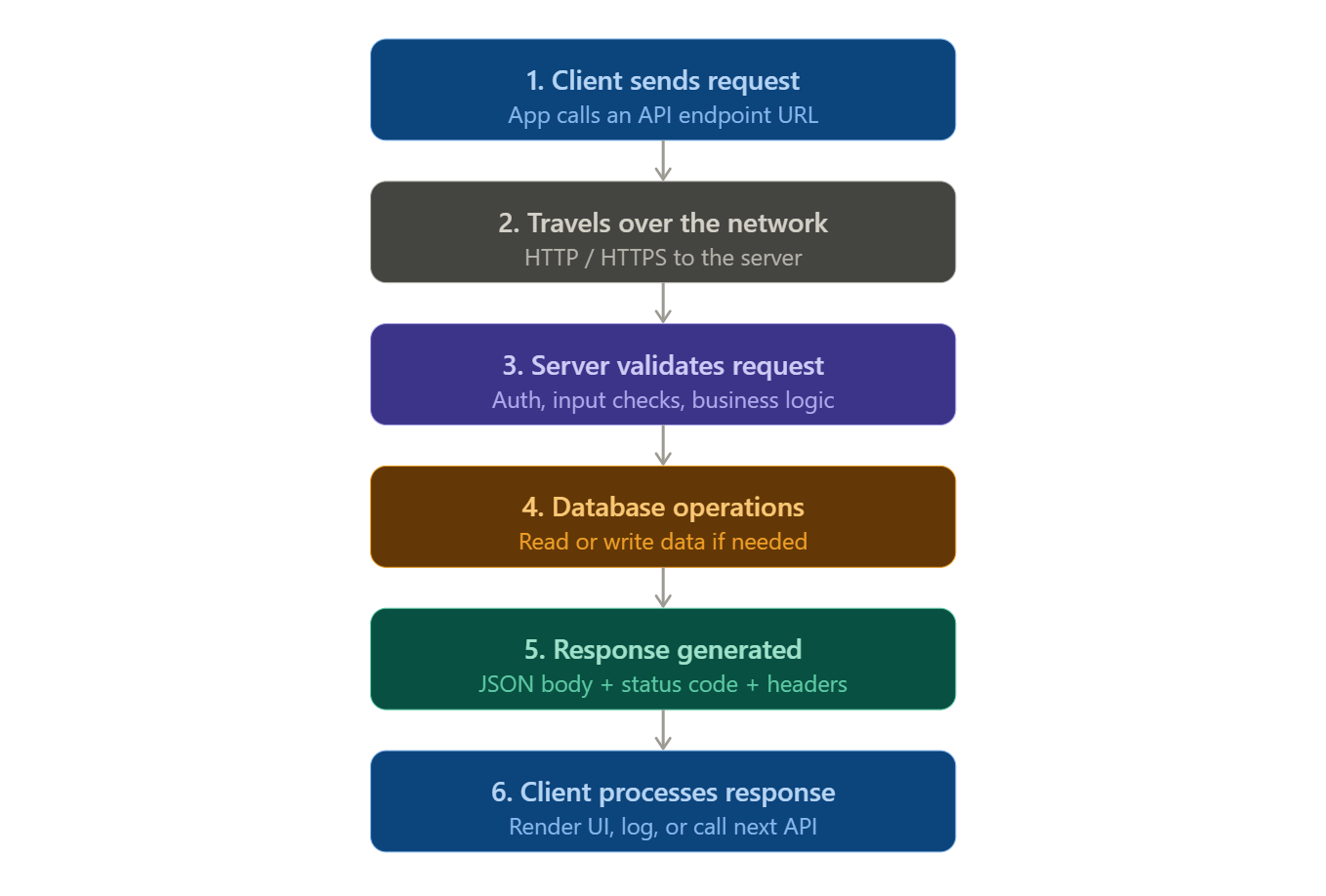
REST APIs work through a request-response cycle using HTTP, the same protocol that powers web browsing:
-
Client initiates a request: Your application makes an HTTP request to an API endpoint.
-
Request travels over the network: The request moves through the internet over HTTP/HTTPS to reach the server.
-
Server processes the request: The API validates input and performs logic or functionality.
-
Database operations: If needed, the server queries or updates the database.
-
Response generated: The server returns a structured response (often in JSON) with a status code, headers, and a body.
-
Response returned: The client receives the response and processes it, such as rendering a UI, logging, or making further calls.
REST API examples
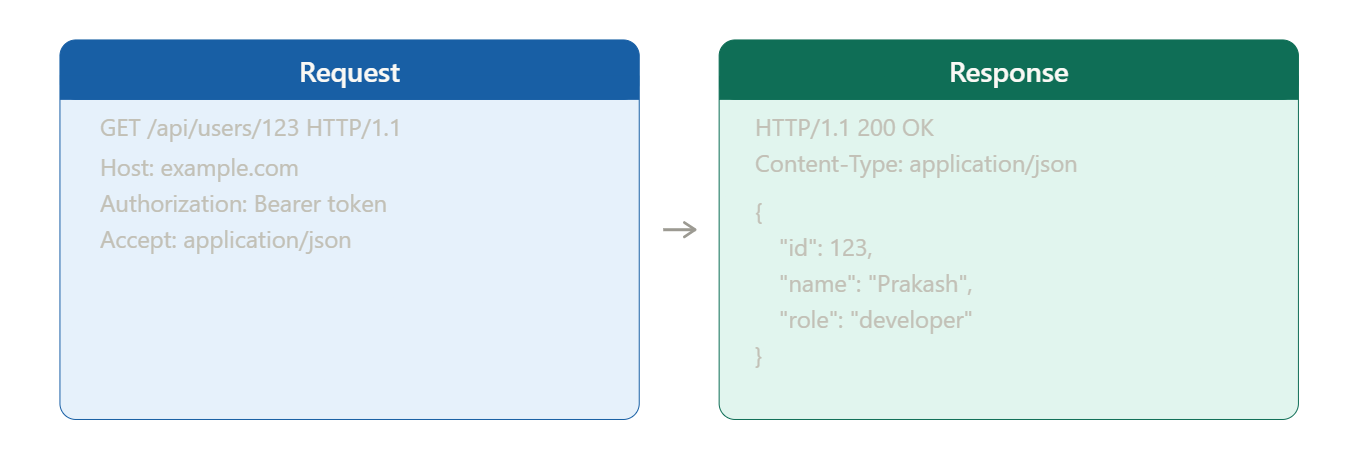
Request:
GET /api/users/123 HTTP/1.1
Host: example.com
Authorization: Bearer Your_Token
Accept: application/json
Response:
HTTP/1.1 200 OK
Content-Type: application/json

{
  "id": 123,
  "name": "Prakash",
  "email": "prakash@example.com",
  "role": "developer"
}
HTTP methods in REST (with examples)
| Action | HTTP Method | Example Endpoint |
|---|---|---|
| Fetch all resources | GET | GET /api/items |
| Fetch a single resource | GET | GET /api/items/101 |
| Create a new resource | POST | POST /api/items |
| Fully update a resource | PUT | PUT /api/items/101 |
| Partially update a resource | PATCH | PATCH /api/items/101 |
| Remove a resource | DELETE | DELETE /api/items/101 |
| Filter or search data | GET | GET /api/items?type=active |
HTTP Methods in REST
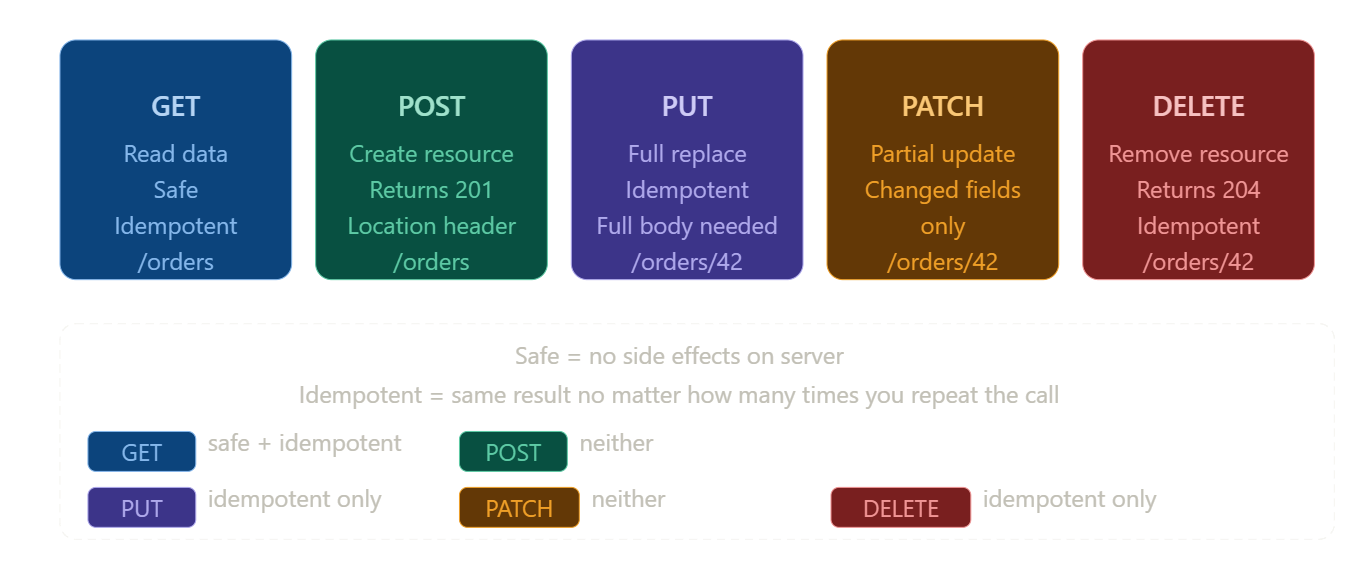
GET : Retrieve data
GET is used to fetch data from the server. It is safe, idempotent, and cacheable.
Examples:
GET /api/products
GET /api/products/789
GET /api/users?role=admin&limit=10
POST : Create new resources
POST is used to create a new resource. It is not idempotent and usually returns 201 Created with a Location header.
Example:
POST /api/orders
Content-Type: application/json

{
"product_id": "789",
"quantity": 2,
"customer_id": "12345"
}
PUT : Replace a resource
PUT is used to completely replace an existing resource. It is idempotent, meaning multiple requests give the same result.
Example:
PUT /api/users/12345
Content-Type: application/json

{
  "name": "Aman Sharma",
  "email": "aman@example.com",
  "role": "User"
}
PATCH : Partially update a resource
PATCH is used to update specific fields of a resource. Only the provided fields are modified.
Example:
PATCH /api/users/12345
Content-Type: application/json

{
  "email": "updated@example.com"
}
DELETE : Remove a resource
DELETE is used to remove a resource from the server.
Example:
DELETE /api/orders/456
Understanding REST Responses
Whenever you make a request to a REST API, the server always sends back a response.
This response tells you what happened — whether the request was successful, failed, or needs further action.
What a Response Contains
A typical REST API response has three main parts:
-
Status Code : indicates the result of the request (e.g., 200, 201, 400, 401, 404, 500)
-
Headers : provide additional information about the response (e.g., Content-Type, Cache-Control, rate limiting)
-
Body : contains the actual data returned by the server (usually in JSON format)
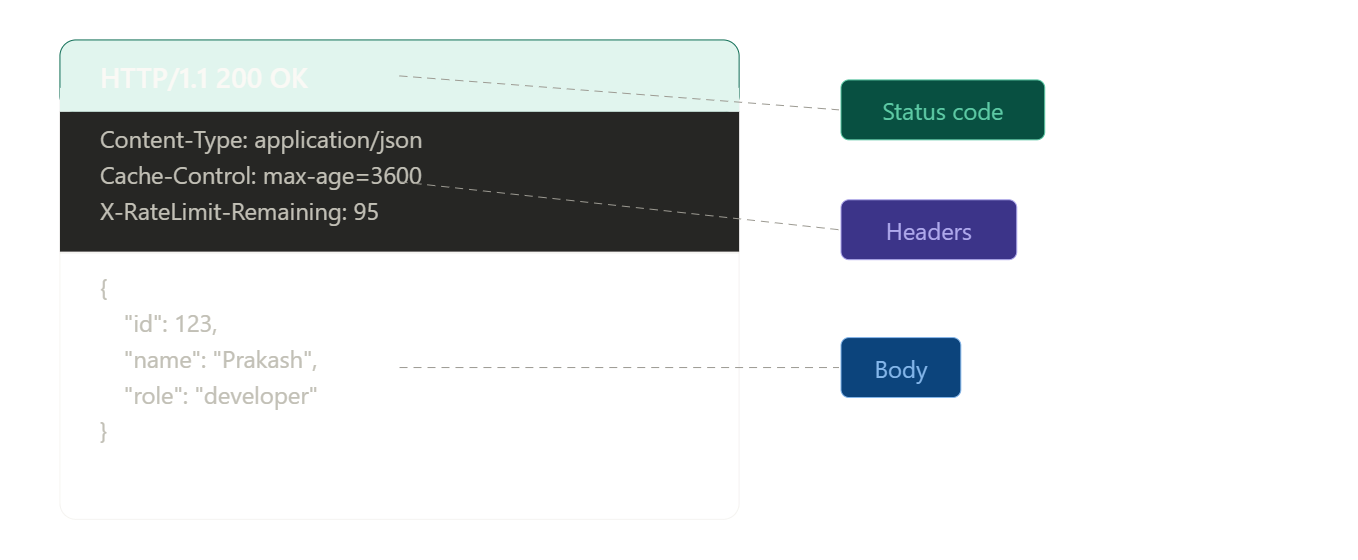
Example Response
HTTP/1.1 200 OK
Content-Type: application/json
Cache-Control: max-age=3600
X-RateLimit-Remaining: 95

{
  "id": 123,
  "name": "Prakash",
  "email": "prakash@example.com",
  "role": "developer"
}
What REST APIs Are Used For
REST APIs are used in almost every modern application. Their simplicity and flexibility make them suitable for a wide range of use cases.
Cloud Applications
REST APIs work well in cloud environments because they are stateless and cacheable. This makes it easier to scale applications across multiple servers and regions.
Microservices Architecture
In microservices, each service handles a specific responsibility. REST APIs provide a clear and consistent way for these services to communicate with each other.
Web and Mobile Applications
REST APIs are platform-independent, which means they can be used by:
- web apps
- mobile apps
- IoT devices
This makes them ideal for building modern applications.
Third-Party Integrations
REST APIs make it easy to connect with external systems and services. Because they follow standard patterns, other developers can quickly understand and use them.
Benefits of REST APIs
REST APIs are widely used because they offer several important advantages that make systems easier to build and scale.
Scalability
REST APIs are stateless, which means each request is independent. This allows servers to handle multiple requests efficiently and makes horizontal scaling much easier.
Flexibility
REST APIs support different data formats such as JSON, XML, or plain text. This flexibility allows different types of clients (web, mobile, etc.) to interact with the same API.
Decoupling
REST follows a client-server architecture, meaning the frontend and backend are independent. This allows both sides to evolve, update, and scale without affecting each other.
Lightweight
REST uses standard HTTP methods and usually returns compact data (like JSON). This makes it fast and efficient, especially for mobile and low-bandwidth environments.
REST API Versioning
APIs evolve over time. New features are added, data structures change, and old behavior may need to be updated. To avoid breaking existing applications, APIs use versioning.
Versioning allows you to introduce changes while still supporting older clients.
Common Versioning Strategies
1. URI Versioning
The version is included directly in the URL.
GET /api/v1/users
GET /api/v2/users
2. Header Versioning
The version is specified in the request headers.
GET /api/users
Accept: application/vnd.company.v1+json
- Keeps URLs clean
- Slightly harder to test and debug
3. Query Parameter Versioning
The version is passed as a query parameter.
GET /api/users?version=1
- Easy to implement
- Generally less preferred
Designing Resource URIs the Right Way
Before writing a single line of code, model your resources — the nouns in your system.
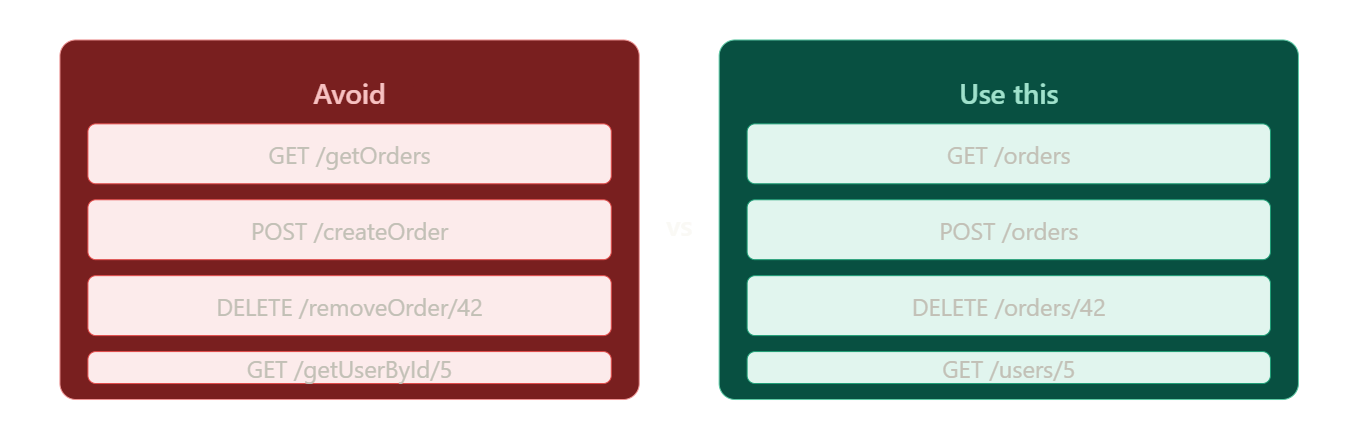
Nouns in, verbs out
Your URI names the thing being acted on. The HTTP method is the action.
✔️ right
GET    /orders
POST   /orders
DELETE /orders/42

❌ wrong
GET    /getOrders
POST   /createOrder
DELETE /removeOrder/42
Keep nesting shallow
Two levels is the practical limit. Deeper nesting creates URLs that break whenever relationships change.
/customers/5/orders           -- maintainable
/customers/5/orders/99/items  -- too deep, avoid this
Never expose your database
Your API is an abstraction over your data — not a direct mirror of your tables. If your table is named tbl_usr_data, that name should never appear in a URL. Design your URIs in business terms.
HTTP Status Codes: The Full Picture
Status codes are the language your API uses to respond. Use them accurately.
2xx  -- it worked
3xx  -- go somewhere else
4xx  -- you made a mistake
5xx  -- we made a mistake
| Code | Name | When to use |
|---|---|---|
200 | OK | Standard success for GET, PUT, PATCH |
201 | Created | Resource created via POST |
204 | No Content | Success, no body — use for DELETE |
301 | Moved Permanently | Resource URL changed permanently |
304 | Not Modified | Cached version is still valid |
400 | Bad Request | Malformed request or invalid input |
401 | Unauthorized | Not authenticated |
403 | Forbidden | Authenticated but not permitted |
404 | Not Found | Resource does not exist |
409 | Conflict | Duplicate or version mismatch |
415 | Unsupported Media Type | Cannot handle that Content-Type |
422 | Unprocessable Entity | Valid JSON but fails validation |
429 | Too Many Requests | Rate limit hit |
500 | Internal Server Error | Something broke on the server |
503 | Service Unavailable | Temporarily down |
A common mistake is returning 200 OK with an error message in the body. Use the correct status code — that is what clients, monitoring tools, and load balancers expect.
Structured Error Responses
A status code tells the client that something went wrong. A structured error body tells them what, why, and where to look for help.
HTTP/1.1 400 Bad Request
Content-Type: application/json

{
  "error": "validation_failed",
  "message": "The 'email' field is required.",
  "field": "email",
  "requestId": "req-7x2k9p",
  "docs": "https://api.yourapp.com/docs/errors#validation_failed"
}
Every error response should tell the developer:
- what went wrong (
error,message) - which request this was (
requestId— for support tickets) - where to learn more (
docs)
Pagination, Filtering, and Sorting
Never return an unbounded collection. If you have 50,000 orders and someone calls GET /orders, your server will either time out or return a 50 MB payload. Always paginate.
Pagination with limit and offset
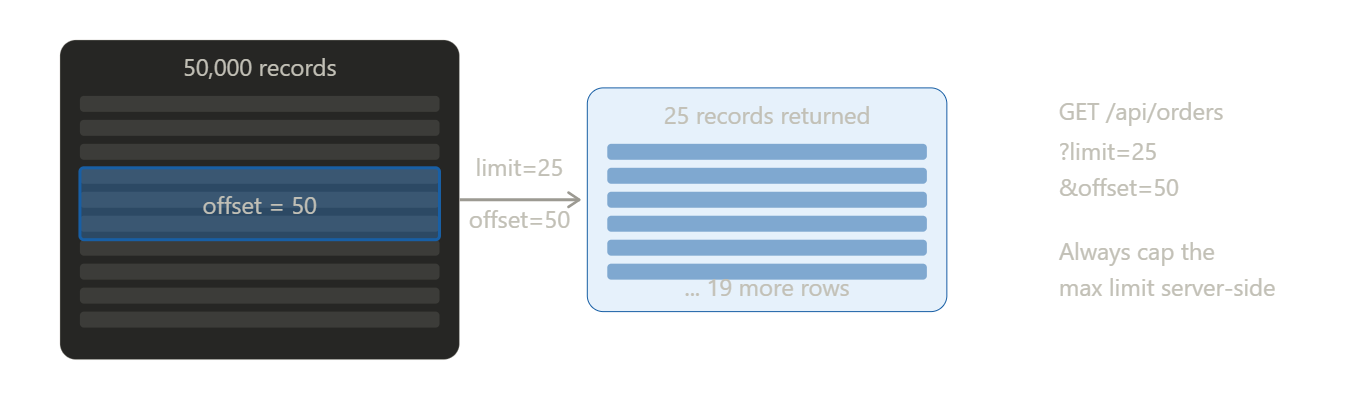
GET /api/orders?limit=25&offset=50
{
  "data": [ ... ],
  "meta": {
    "total": 320,
    "limit": 25,
    "offset": 50
  },
  "_links": {
    "next": "/api/orders?limit=25&offset=75",
    "prev": "/api/orders?limit=25&offset=25"
  }
}
Always cap your limit. If a client requests limit=999999, return your maximum (e.g., 100) or a 400 Bad Request.
Filtering
GET /api/orders?status=shipped&minCost=100
Sorting
GET /api/orders?sort=createdAt&order=desc
Field selection
Let clients request only the fields they need — useful for mobile clients on slow connections:
GET /api/orders?fields=id,status,total
Authentication and Security
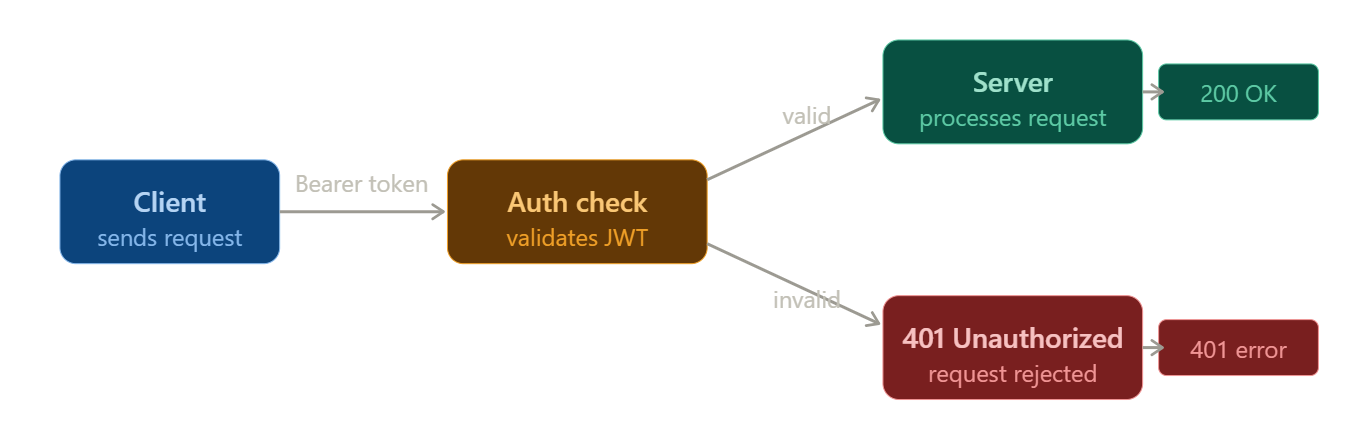
Bearer tokens (OAuth 2.0 / JWT)
GET /api/orders HTTP/1.1
Authorization: Bearer eyJhbGciOiJIUzI1NiIsInR5cCI6IkpXVCJ9...
The server validates the token on every request. No session is stored server-side, keeping things stateless and scalable.
API keys
GET /api/orders HTTP/1.1
X-API-Key: sk_live_abc123xyz
Simpler than OAuth. Common for server-to-server integrations where a user is not involved.
Security checklist
- Always use HTTPS — never send tokens over plain HTTP
- Validate every input — never trust client data
- Rate limit all endpoints, especially auth endpoints
- Return 401 when a token is missing or expired
- Return 403 when a resource exists but access is denied
- Never expose stack traces or internal details in error responses
- Use short-lived tokens and refresh tokens, not long-lived secrets
Handling Long-Running Operations
Some operations take too long for a single HTTP round-trip — bulk imports, report generation, video processing. The pattern:
Step 1: Server returns 202 Accepted immediately.
POST /api/reports/generate
Content-Type: application/json

{ "type": "annual-sales", "year": 2025 }
HTTP/1.1 202 Accepted
Location: /api/jobs/abc-123

{
  "jobId": "abc-123",
  "status": "queued"
}
Step 2: Client polls the status endpoint.
GET /api/jobs/abc-123
{
  "status": "in_progress",
  "progress": 62,
  "_links": {
    "cancel": { "href": "/api/jobs/abc-123", "method": "DELETE" }
  }
}
Step 3: When done, return 303 See Other with the result location.
HTTP/1.1 303 See Other
Location: /api/reports/annual-sales-2025
Common Mistakes to Avoid
Verbs in URLs
-- wrong
POST /api/createUser

-- right
POST /api/users
Returning 200 for errors
-- wrong — never do this
HTTP/1.1 200 OK
{ "success": false, "error": "User not found" }
Use 404. That is what it is for.
No pagination
-- wrong
GET /api/orders   -- returns 50,000 records at once

-- right
GET /api/orders?limit=25&offset=0
Leaking internal details
-- wrong
GET /api/tbl_usr_data/123
{ "sql_error": "..." }

-- right
GET /api/users/123
{ "error": "not_found", "message": "User 123 does not exist." }
Inconsistent naming
Pick one style and use it everywhere:
-- inconsistent
/api/userProfile
/api/user_profile

-- consistent (kebab-case is recommended)
/api/user-profiles
The Richardson Maturity Model
A useful way to measure how RESTful your API actually is:
| Level | Name | What it means | Example |
|---|---|---|---|
| 0 | Swamp of POX | Single endpoint, all POST | /api with action in body |
| 1 | Resources | Separate URL per resource | /orders, /users |
| 2 | HTTP verbs | Correct methods and status codes | GET /orders, 201 on create |
| 3 | HATEOAS | Responses include links to next actions | _links in every response |
Most production APIs sit at Level 2. Level 3 is the ideal but requires deliberate design upfront. Start at Level 2 and evolve.
Wrapping Up
A good REST API feels invisible. Developers can pick it up quickly, the endpoints do what they say, errors are informative, and things just work.
The patterns in this guide are not arbitrary rules — they are conventions that have been battle-tested across millions of APIs. Following them means your API will feel familiar to any developer who has worked with REST before.
Start with clean URIs, correct HTTP methods, and consistent status codes. Add pagination and proper error responses. Layer in auth and versioning. And always design the API you would want to consume yourself.